Unicorn Planner for KDP Interiors: A Practical Guide to Avoiding Common Publishing Pitfalls
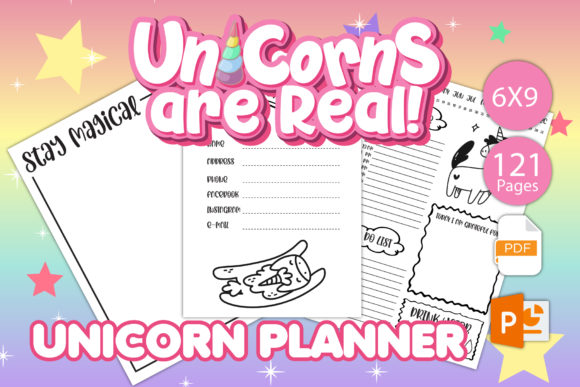
Entering the low-content book market with a niche as specific as unicorns requires more than just whimsical graphics; it demands technical precision. The Unicorn Planner for KDP Interiors is designed to bridge the gap between creative fantasy and functional organization, but success depends entirely on how you implement the asset. Many creators assume that purchasing a pre-made interior guarantees sales or a seamless publishing experience. While this 121-page, 6x9 inch template provides a professional foundation, overlooking specific formatting constraints or audience expectations can lead to rejected manuscripts, poor customer reviews, and wasted marketing budget.
This resource includes both PowerPoint and PDF files specifically formatted for black and white printing with no bleed. Understanding these specifications is not optional. It is the difference between a polished product that looks professionally published and an amateurish book that gets returned by customers. Whether you are a seasoned KDP publisher or a first-time creator targeting the planner niche, recognizing where others fail will help you leverage this unicorn-themed interior effectively.
Misunderstanding the "No Bleed" Specification
The most frequent technical error when using the Unicorn Planner for KDP Interiors involves margin management. This interior is strictly no bleed. This means all content must remain within the safe zone, typically leaving at least a 0.375-inch margin on the outer edge and appropriate gutter space for binding. Creators often attempt to add their own decorative borders, header images, or footer elements without accounting for this limitation.
When you modify the provided PDF or PowerPoint file and push elements too close to the trim line, KDP’s automated review system may flag the manuscript. Even if it passes, the physical result can be disastrous. During the trimming process, guillotine blades have a slight variance. If your unicorn illustrations or planning lines sit right at the edge, they risk being cropped unevenly or disappearing entirely. Always verify that any customizations you make to the coordinating title page or internal layouts respect the original safe zones established in the source files.
The Danger of Ignoring Black and White Contrast
Although unicorns are associated with rainbows and vibrant colors, this interior is optimized for black and white standard ink. A common mistake occurs when users try to force color aesthetics into a grayscale format. Adding gray-scale shading that looks fine on a backlit monitor often prints as muddy, dark blocks on standard 55# or 60# cream or white paper. This reduces the usability of the planner sections, making writing spaces difficult to read.
Instead of converting colorful clip art to grayscale yourself, utilize the high-contrast line art already integrated into this tested interior. If you choose to add personal branding or additional motivational quotes, ensure they are pure black vector lines or high-resolution 300 DPI bitmaps. Test print a single page on your home printer before uploading. What looks like a subtle magical glow on screen might render as a solid black smudge in print, rendering the adjacent planning grid unusable.
Overlooking the Coordination Between Title Page and Body
A significant advantage of this specific Unicorn Planner for KDP Interiors is the included coordinating inside cover title page. However, many publishers treat this as an afterthought or delete it entirely to maximize writing space. This is a missed opportunity for perceived value. The title page sets the tone and confirms to the buyer that they received the correct edition.
Ensure that the metadata on your custom exterior cover matches the interior title page. If your cover says "2024 Magical Unicorn Organizer" but the interior title page is generic or displays conflicting text, customers perceive this as a quality control failure. Use the editable PowerPoint file to align the interior title page with your specific branding. Consistency between the outside cover, the spine, and the first interior page signals professionalism. It tells the buyer that this is a cohesive product, not a mismatched assembly of random assets.
Navigating File Formats Correctly
You receive two distinct file types: 1 PowerPoint file and 1 PDF file. A critical workflow mistake is editing the PDF directly using non-professional software. While PDFs are excellent for final upload, they are not ideal for structural editing. Attempting to move grids, resize margins, or swap fonts in a flattened PDF often results in alignment shifts and font substitution errors.
Always perform your customization in the PowerPoint master file. PowerPoint allows you to adjust layout masters globally, ensuring that every one of the 121 pages remains perfectly aligned. Only export to PDF once your edits are complete and verified. When exporting, select "High Quality Print" or "Press Quality" settings. Uploading a compressed, web-optimized PDF derived from PowerPoint can result in pixelated text and jagged lines, which immediately devalues a planner intended for daily use.
Evaluating Market Fit Beyond the Theme
Technical perfection means nothing if the product does not serve a functional need. A prevalent strategic error is assuming the "unicorn" keyword alone drives sales. The adults aged 20–50 who purchase these planners are often looking for stress relief, nostalgia, or organized escapism alongside utility. They are not buying a coloring book; they are buying a planning tool with a specific aesthetic.
Before finalizing your version of the Unicorn Planner for KDP Interiors, audit the balance between decoration and function. Does the unicorn imagery interfere with the writing space? Are the monthly and weekly spreads actually usable for scheduling, or are they too cluttered with thematic elements? Successful publishers in this niche test the interior's functionality themselves. Print a sample and use it for a week. If you find yourself frustrated by small boxes or illegible headers, your customers will too. Adjust the layout in the PowerPoint file to prioritize utility while maintaining the magical atmosphere.
Cover Creation and Interior Alignment
Since this package is interior only, you must create your own cover. A disconnect between cover promise and interior reality causes negative reviews. If your cover features neon pinks and holographic foils, but the interior is stark black-and-white line art without greyscale shading, buyers feel misled. Your cover design should accurately represent the interior's style.
Use the 6x9 dimensions and 121-page count to calculate your precise spine width before designing. KDP provides a cover calculator that accounts for paper type. Using a generic template or guessing the spine width will result in a cover that wraps incorrectly, placing your title on the back or the barcode on the front. Because this interior is no-bleed, remember that your cover must include bleed (typically 0.125 inches on all sides). Confusing the interior's no-bleed spec with the cover's full-bleed requirement is a rookie error that delays publication.
Ensuring Long-Term Usability and Value
Finally, consider the longevity of the planner. Undated interiors offer flexibility, but they also require the user to do more setup work. If this Unicorn Planner for KDP Interiors is undated, ensure there is adequate space for users to write in dates clearly. If it is dated, verify the year and calendar accuracy before publishing. Nothing destroys trust faster than a planner with incorrect days of the week.
Treat this digital asset as a professional component of your publishing business, not a shortcut. By respecting the technical constraints of the 6x9 no-bleed format, utilizing the correct file types for editing, and ensuring visual consistency between your custom cover and the coordinating title page, you transform a simple template into a high-quality product. The goal is to provide a seamless experience where the unicorn theme enhances the planning process rather than distracting from it. Careful attention to these details separates profitable, long-term KDP assets from forgotten uploads.