Monthly at a Glance - KDP Interiors: A Practical Guide to Quality and Customization
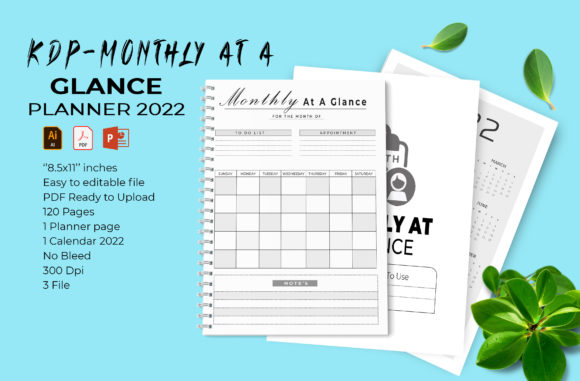
Creating a successful low-content book on Amazon requires more than just uploading a generic template; it demands attention to technical specifications and user experience. When evaluating resources like the Monthly at a Glance - KDP Interiors for 2022, creators must look beyond the surface-level promise of "ready-to-upload" files. This specific interior package offers a comprehensive foundation with 120 pages, including a dedicated cover page and calendar, formatted strictly for US Letter size (8.5 x 11 inches). However, possessing the file is only the first step. The difference between a rejected manuscript and a bestseller often lies in how you verify, edit, and finalize these assets before they ever reach the printing press.
Understanding the Technical Foundation
Many new publishers assume that any PDF labeled as "print-ready" will automatically pass Amazon’s rigorous quality checks. This is a common misunderstanding that leads to frustrating rejection emails or poor customer reviews. The Monthly at a Glance - KDP Interiors resource is designed with specific parameters: it is a no-bleed file at 300 DPI. Understanding what this means is critical for your workflow.
A "no bleed" designation means that all content must remain within a safe margin, typically 0.375 inches from the trim edge on all sides. Because this template is sized at exactly 8.5 x 11 inches without extra bleed area, you cannot simply stretch background elements to the edge of the page. If you attempt to add full-page color backgrounds or border graphics that touch the trim line using this specific file, KDP will either reject the upload or print it with unintended white borders. Always respect the original formatting constraints unless you are proficient enough to resize the artboard and adjust margins manually in Adobe Illustrator.
Furthermore, while 300 DPI is the industry standard for crisp printing, resolution can degrade during editing. A frequent error occurs when users export their final PDF from PowerPoint or Illustrator using default web settings rather than high-quality print presets. Even if the source vector shapes are high quality, a low-resolution export renders them useless. Always verify your final output by zooming in to 100% or higher on your screen to check for pixelation before uploading.
Navigating File Compatibility and Editing Workflows
This interior package provides flexibility through multiple file formats, including Illustrator CC 2019 (AI/EPS), Microsoft PowerPoint 2016 (PPTX), and a pre-formatted PDF. While having options is beneficial, choosing the wrong tool for your skill level can compromise the final product. Beginners often gravitate toward PowerPoint because it feels familiar, but this choice carries risks regarding font embedding and alignment precision.
If you choose to edit the PPTX file, be aware that PowerPoint is not a native print design application. Fonts may shift if you do not have the exact typefaces installed, and vector shapes might rasterize unexpectedly upon export. For professional results, Adobe Illustrator is the superior choice. The included AI and EPS files contain fully editable vectors and 100 sizable shapes. Using Illustrator ensures that lines remain sharp at any scale and that color profiles (CMYK vs. RGB) are managed correctly for physical printing.
A practical warning for those using older software versions: this asset specifies CC 2019 and PowerPoint 2016. If you are using significantly older versions, you may encounter compatibility issues where layers are flattened or effects are lost. Conversely, if you are using much newer versions, always perform a test export. Do not assume backward or forward compatibility is perfect. Open every page of your edited file to ensure that the 2022 calendar dates align correctly and that no text boxes have shifted during the saving process.
Customization Strategy: Avoiding the Duplicate Content Trap
One of the most significant pitfalls in the KDP space is publishing interiors that are identical to thousands of others. Since this Monthly at a Glance - KDP Interiors kit includes 100 vector shapes and easy-to-change colors, you have the tools to avoid this issue, but you must use them intentionally. Simply changing the cover title while leaving the interior layout untouched is rarely enough to stand out in a saturated market.
Effective customization goes beyond aesthetic tweaks; it involves structural adaptation. Consider who will actually use this planner. Is it for teachers, nurses, or real estate agents? Use the editable vector shapes to create niche-specific tracking sections or notes pages that replace generic filler content. The ability to easily change colors should be used to establish brand consistency or improve readability, not just to create arbitrary variations. High contrast is essential for usability; avoid light gray text or low-contrast patterns that make writing difficult for the end-user.
Additionally, verify the accuracy of the 2022 calendar data. While the template claims to include the correct dates, automated tools and human error can introduce discrepancies. Cross-reference every month against a verified perpetual calendar. A single incorrect date can result in negative reviews that permanently damage your book's ranking. This verification step is non-negotiable and takes less than thirty minutes, yet it is frequently overlooked by creators rushing to publish.
Pre-Publication Verification Checklist
Before you click publish or send your file to a local print shop, conduct a thorough audit. Relying solely on the "ready to upload" label is insufficient. Your due diligence protects your reputation and prevents wasted ad spend on defective products.
- Margin Safety Check: Measure the distance from the trim edge to the nearest text or graphic element. Ensure it meets KDP’s minimum requirements for an 8.5 x 11 no-bleed book.
- Font Embedding: Confirm that all fonts are embedded in your final PDF. Missing fonts cause substitution errors that ruin layout integrity.
- Color Profile Validation: Ensure your document is set to CMYK for print. RGB colors often appear duller or shifted when converted by the printer’s RIP software.
- Page Count Confirmation: Verify that your final PDF has exactly 120 pages (or whatever count you intended after editing). Adding or removing pages changes the spine width calculation for your cover.
- Physical Proofing: Whenever possible, order a physical proof or print a sample at home. Screen brightness can mask issues like faint lines or poor contrast that become obvious on paper.
Making Informed Decisions for Long-Term Success
The Monthly at a Glance - KDP Interiors serves as an excellent starting point for entrepreneurs and creators looking to streamline their production workflow. Its value lies not just in the time saved, but in the professional baseline it establishes. However, treating it as a finished product rather than a raw material is where many fail. By understanding the technical nuances of no-bleed formatting, respecting software compatibility, and committing to meaningful customization, you transform a generic template into a valuable resource for your audience.
Remember that quality builds trust. Customers returning to your author page expect consistency and reliability. Taking the extra time to master these files, verify your data, and optimize your exports pays dividends in customer satisfaction and long-term sales performance. Whether you are printing at home for personal use or building a publishing business, approaching these interiors with a critical, detail-oriented mindset ensures your final product meets the high standards of today’s competitive marketplace.